



Guides/101
Published on Nov 11th, 2026
How Do 3D Scanners Work Without Markers? 3 Marker-Free Scanning Methods Explained
Discover how 3D scanners work without markers. Explore three marker-free scanning methods: feature alignment, turntable alignment, and optical tracking, and learn which approach suits your application.
3D scanning markers help scanners track their position and align multiple scans into a complete 3D model. But are markers always necessary? No. 3D scanners can also achieve alignment without markers through several tracking technologies.
In our previous 3D Scan 101 with Mia video series Why Are There Dots on 3D Scans, we explained why markers are used and how they help improve scanning alignment. This time, let's explore what happens when you scan without them.
There are three main approaches to marker-free 3D scanning: feature alignment, turntable alignment, and optical tracking. Each works differently and suits different types of objects and scanning scenarios.
How Does Marker-Free 3D Scanning Work?
Marker-free 3D scanning eliminates the need to place physical markers on the object. Instead, the scanner uses alternative references, such as the object's geometry, surface texture, a controlled rotation angle, or tracking targets on the scanner itself, to determine its position and align scan data. Let's explore how these three approaches work.
1. Feature Alignment: Tracking the Object's Own Geometry and Texture
Feature alignment uses an object's geometric characteristics as reference points. Instead of tracking external markers, the scanner identifies features such as edges, curves, holes, and surface details to determine its position during scanning.
But what if the object has few geometric features? Surface texture can help, too. If the scanner has a texture camera, it can use visible surface patterns to track its position. This is known as texture alignment. It follows the same basic tracking logic but relies on surface texture rather than geometric features.
This approach works well with objects that have sufficient geometric details or distinctive surface patterns. However, smooth plates, spheres, and symmetrical cylinders may lack enough trackable information, making stable alignment challenging.

EinScan Libre scanning a relief painting based on feature+texture alignment
SHINING 3D Scanners with Feature Alignment
SHINING 3D offers several marker-free scanning solutions based on feature alignment principles, such as FreeScan Omni's IR Mode, OptimScan Q Series' Feature Alignment Mode, and EinScan Libre's Laser HD Mode. These options provide different scanning configurations for a range of measurement needs.
2. Turntable Alignment: Let the Turntable Handle Positioning
Turntable alignment is commonly used in desktop 3D scanning. The object is placed on a motorized turntable, which rotates it at known angles while the scanner captures data from different positions. Since the rotation is controlled and known, the system can align the captured scans without requiring markers on the object.
This method offers a highly automated workflow and reduces manual alignment work. It is particularly suitable for small and medium-sized objects that fit on the turntable. Its main limitation is that the object's size and weight must stay within the turntable's dimensions and load capacity.
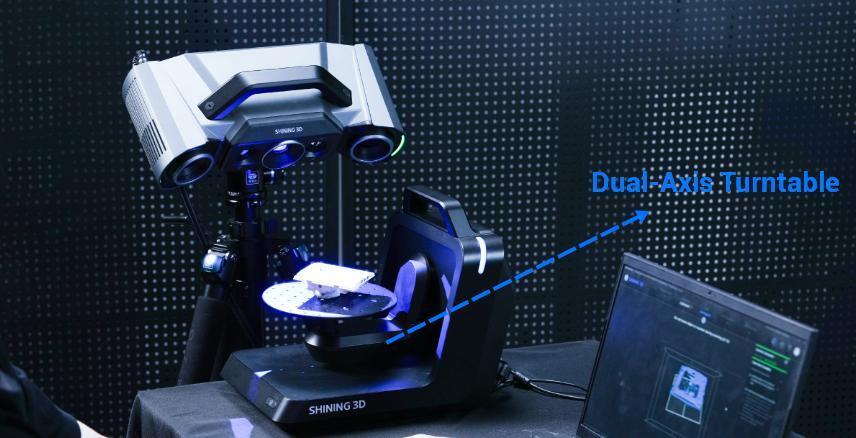
OptimScan Q12 scans a workpiece with a dual-axis turntable
SHINING 3D Desktop 3D Scanners with Turntable Alignment
SHINING 3D's high precision 3D inspection systems, including OptimScan Q Series, OptimScan Q HD Series, and AutoScan Inspec2, all support turntable-based alignment. By combining automated rotation with scan data alignment, these systems help capture objects from multiple angles efficiently, making them suitable for detailed 3D measurement of smaller parts.
3. Optical Tracking: Tracking the Scanner's Position Independently
Unlike feature alignment, which relies on the object's geometry or texture, optical tracking determines the scanner's position independently.
An external optical tracker continuously observes tracking targets built into the scanner, calculating its position and orientation as it moves around the object. This allows scanning without relying on the object's own surface features for alignment.
Optical tracking provides greater flexibility when scanning large objects or surfaces with few geometric features. However, it requires a clear line of sight between the optical tracker and the scanner's tracking targets. If this view is blocked, tracking may be interrupted.
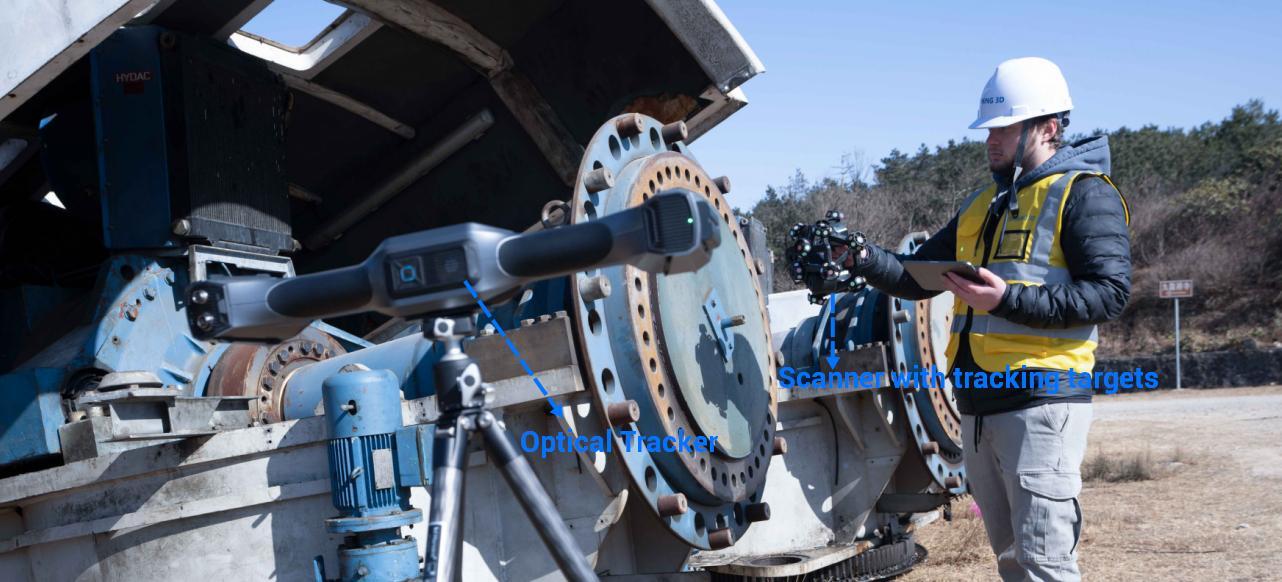
Marker-free scanning a wind turbine hub with FreeScan Trak Nova
SHINING 3D FreeScan Trak Series
SHINING 3D's FreeScan Trak ProW+ and FreeScan Trak Nova Series use optical tracking technology to support flexible 3D scanning of large and complex industrial parts. By tracking the scanner's position independently, these systems reduce reliance on geometric features or markers placed on the object's surface.
How to Choose the Right 3D Scanner for Your Application?
Whether a scanner requires markers is only one factor to consider when choosing a 3D scanning solution. Object size, required accuracy, scanning efficiency, surface characteristics, and working environment all play important roles. The best choice depends on your specific measurement task, not simply whether the scanner supports marker-free scanning.
For more guidance, explore our 3D Scanner Selection Guide to learn what to consider when choosing a scanner for your application.
Three Ways to Go Marker-Free
Marker-free 3D scanning isn't a single technology. Feature alignment, turntable alignment, and optical tracking each offer a different way to maintain scan alignment, with their own strengths and ideal applications.
Feature Alignment vs. Turntable Alignment vs. Optical Tracking
| Method | Tracking Reference | Best Suited For | Main Limitation |
| Feature Alignment | Object geometry | Objects with sufficient geometric features | Requires trackable geometry |
| Turntable Alignment | Known rotation angle | Objects that fit on a turntable | Size and load capacity limits |
| Optical Tracking | Scanner tracking targets | Large or feature-poor objects | Requires clear line of sight |
But going marker-free isn't always the goal. The right solution depends on your part's size, surface characteristics, measurement requirements, and working environment. Whether you need to scan intricate components, automate the measurement of smaller parts, or inspect large industrial structures, SHINING 3D offers a range of scanning solutions to meet different needs.
Not sure which approach is right for your application? Contact our team for expert guidance and find the 3D scanning solution that works best for you.
Frequently Asked Questions
-
Can you 3D scan without markers?
Yes. Depending on the scanner, marker-free scanning can use object geometry, surface texture, a motorized turntable, or an external optical tracking system to achieve alignment. The most suitable method depends on the object's size, shape, surfaces, and other scanning requirements.
-
Is marker-free 3D scanning as accurate as marker-based scanning?
It depends on the scanner's technology, specifications, tracking stability, and scanning conditions. Marker-free scanning can achieve high accuracy when the appropriate method is used in suitable conditions. Accuracy should always be evaluated against the requirements of the specific application.
-
How do 3D scanners track their position without markers?
They use alternative references. Feature alignment tracks geometric details, texture alignment uses surface patterns, turntable alignment relies on controlled rotation, and optical tracking follows targets on the scanner itself.
-
Can you scan smooth or featureless objects without markers?
It can be challenging with feature alignment because smooth or symmetrical surfaces may provide insufficient tracking information. Depending on the setup, texture alignment, turntable alignment, or optical tracking may offer alternatives.
Share on Social Media


