


.jpg?width=1200&height=675&name=EinScan%20Libre%20(1).jpg)
Guides/101
Published on Oct 24th, 2026
3D Scanner Evaluation Matrix for Engineering Teams
A well-constructed 3D scanner evaluation matrix transforms a subjective vendor comparison into a documented, repeatable procurement process. By defining weighted criteria tied to your actual parts, workflows, and industry requirements, your team selects a scanner based on operational fit rather than marketing specifications.

Core Evaluation Categories for Your Matrix
Building an effective matrix starts with identifying the right evaluation categories. The categories below cover the critical dimensions that separate a scanner that performs well in a vendor demo from one that performs well in your production environment.
How to Evaluate 3D Scanner Accuracy and Repeatability
Accuracy is the first criterion most teams consider, and for good reason. For quality inspection, your scanner must capture dimensional data within tolerances defined by your GD&T (Geometric Dimensioning and Tolerancing) requirements. Accuracy alone is not sufficient. Repeatability determines whether the scanner produces consistent results across multiple scans of the same part.
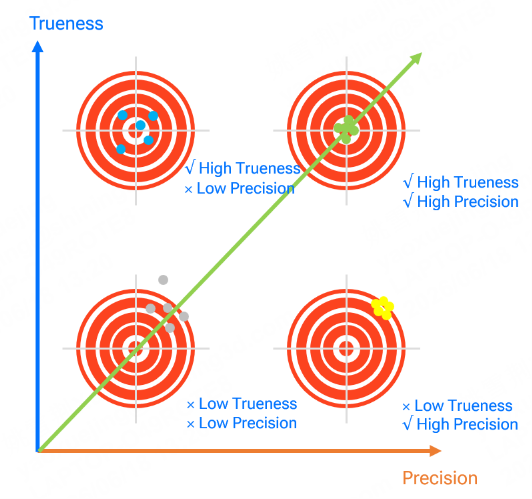 Accuracy v.s. repeatability
When scoring accuracy in your matrix, focus on these measurable factors:
-
Probing accuracy: How closely a single measured point matches the true surface position.
-
Volumetric accuracy: How consistently the scanner measures geometry across its full working volume. For large parts, this is often the limiting specification.
-
Standards validation: Whether accuracy claims are verified against recognized international standards such as VDI/VDE 2634 or ISO 10360, and whether the manufacturer maintains accredited calibration infrastructure.
How to Evaluate Traceability and Certification Requirements
For regulated industries such as automotive, civil aviation, and medical device manufacturing, traceability is non-negotiable. Your matrix should include criteria that verify whether a scanner's measurement results can be traced back to a documented calibration chain.
Key traceability factors to score:
-
Calibration laboratory accreditation: Is the manufacturer's calibration laboratory accredited to ISO/IEC 17025?
-
Acceptance test procedures: Does the manufacturer provide documented acceptance test results conforming to VDI/VDE 2634 or ISO 10360?
-
Field calibration: Can the scanner be recalibrated on-site, and does the manufacturer provide calibration artifacts and procedures?
Traceability separates metrology-grade instruments from general-purpose scanning devices. If your inspection results need to withstand audits, customer quality reviews, or regulatory scrutiny, this category should carry significant weight in your matrix.

What Role Does Application Fit Play in Scanner Evaluation?
Different scanning technologies perform differently depending on part size, surface material, geometry complexity, and environmental conditions. A scanner that delivers outstanding results on small machined components may not be the right choice for large fabricated assemblies measured on a factory floor.
Consider these application-specific factors when building your matrix:
-
Part size range: What is the typical measurement volume you need to cover? FreeScan handheld scanners like the offer portability and flexibility for medium to large parts, while desktop systems like the OptimScan series provide automated precision for small components.
-
Surface conditions: Reflective, dark, or multi-material surfaces present challenges for some scanning technologies. Blue laser and hybrid light source scanners handle these surfaces more effectively than single-mode structured-light systems.
-
Environmental conditions: Shop floor vibration, temperature variation, and ambient light all affect scanning performance. Score each candidate based on validated performance under conditions that match your operating environment.
How to Build a Weighted Scoring System for Your Matrix
Defining categories is only the first step. The real power of an evaluation matrix comes from weighting each category to reflect your team's priorities.
Step 1: Define Your Primary Application
Start by identifying the primary use case that will drive scanner utilization. Common primary applications include quality inspection (dimensional verification, first-article inspection, GD&T analysis), reverse engineering (Scan-to-CAD workflows for legacy parts, tooling design, or product development), and production monitoring (in-process measurement for trend analysis and SPC).
Your primary application determines which evaluation categories carry the highest weights. For quality inspection, accuracy, traceability, and reporting software will dominate. For reverse engineering, resolution, scanning speed, and CAD software integration take priority.
Step 2: Assign Percentage Weights to Each Category
Distribute 100 percentage points across your evaluation categories. This forces your team to make explicit trade-offs. A common starting distribution for quality inspection might look like this:
| Category | Weight |
| Accuracy and Repeatability | 30% |
| Traceability and Certification | 20% |
| Software Workflow Fit | 20% |
| Scanning Speed and Throughput | 15% |
| Application Fit | 10% |
| Total Cost of Ownership | 5% |
For a reverse engineering team, you might shift weight from traceability toward scanning speed and software integration. The key is that the weighting reflects your team's documented requirements, not a vendor's recommended priorities.
Step 3: Establish a Consistent Scoring Scale
Use a numeric scoring scale that all evaluators understand and apply consistently. A 1-to-5 scale works well for most teams:
-
5: Exceeds requirements with documented evidence.
-
4: Meets all requirements fully.
-
3: Meets most requirements with minor gaps.
-
2: Meets some requirements but has notable limitations.
-
1: Does not meet requirements.
Require evaluators to document the evidence behind each score. A score of 5 for accuracy should be backed by validated test results on representative parts, not by datasheet claims alone.
Step 4: Test on Representative Parts Before Scoring
Never finalize your matrix scores based solely on vendor demonstrations or published specifications. Request a benchmark test on parts that represent your actual production work. Bring parts with the geometries, surface finishes, and tolerances that your team scans daily.
During the benchmark, evaluate not just the final accuracy but the complete workflow.
-
How long does it take from unpacking the scanner to a completed inspection report?
-
How much operator training is required?
-
Does the software produce the outputs your downstream processes need without manual intervention?
Common Mistakes to Avoid When Evaluating 3D Scanners
Even with a well-built matrix, teams can fall into procurement traps. These are the mistakes that lead to scanners gathering dust in a metrology lab.
Focusing on Lab Accuracy Instead of Shop Floor Performance
A scanner that achieves micron-level accuracy in a temperature-controlled laboratory may not replicate that performance in a 35-degree Celsius factory with vibration from nearby machinery. Your evaluation should include performance verification under conditions that match your operating reality.
When vendors present accuracy data, ask whether those results conform to an acceptance test protocol. Proprietary test methods that measure accuracy under ideal conditions do not predict real-world performance reliably.
Ignoring Software and Reporting Capabilities
Hardware captures the data. Software turns that data into actionable inspection results, CAD models, or deviation reports. A scanner with outstanding hardware specifications paired with limited software creates a bottleneck in your workflow.
Your matrix should score software capabilities independently from hardware performance. Include criteria for report customization, GD&T analysis depth, export format compatibility, and integration with your existing PLM or quality management systems.
Overlooking Total Cost of Ownership
The purchase price of a scanner represents only a fraction of its total cost. Factor in ongoing calibration costs, software licensing models (subscription versus perpetual licenses), training requirements, maintenance, and consumables such as calibration artifacts and reference targets.
SHINING 3D provides lifetime free software licenses with no hidden subscription fees for its scanning software, reducing the long-term cost of ownership compared to models that require ongoing licensing payments.
Skipping Multi-Stakeholder Input
A scanner purchased by a metrology manager without input from the production engineers who will use it daily often fails to meet operational needs. Include representatives from quality, production, engineering, and IT in your evaluation process to ensure the matrix captures requirements from every team that will interact with the scanner.
How to Apply Your Evaluation Matrix to Different Industries
The same matrix framework adapts to different industries by adjusting category weights and adding industry-specific criteria.
Automotive and Aircraft OEM Inspection
For automotive and civil aviation applications, traceability and certification requirements dominate. Your matrix should heavily weight ISO 10360 compliance, documented calibration chains, and the ability to generate audit-ready inspection reports. Part complexity in these industries demands scanners that handle reflective surfaces, deep features, and thin-wall geometries without sacrificing accuracy.
Blue laser scanning technology performs well on the reflective metal surfaces and dark materials common in automotive and aerospace components. SHINING 3D's FreeScan series addresses these surface challenges while maintaining metrology-grade accuracy of up to 0.02 mm.
.png?width=780&height=559&name=W+%20Webpage%20(2).png)
Reverse Engineering and Product Development
Reverse engineering teams prioritize resolution, scanning speed, and Scan-to-CAD software integration. Your matrix may weight the ability to capture fine geometric detail, process scan data efficiently into editable CAD models, and export data in formats compatible with your design software.
The EinScan series from SHINING 3D supports multiple scan modes. This flexibility lets your team adapt the same scanner to different part sizes and detail requirements without investing in multiple systems.

Energy, Marine, and Heavy Manufacturing
Large-part measurement introduces unique challenges. Your matrix should include criteria for volumetric accuracy over extended measurement ranges, portability for on-site scanning, and resistance to environmental factors like wind, temperature fluctuation, and vibration.
Optical dynamic tracking systems combined with handheld scanners provide the measurement range and accuracy needed for large assemblies. The FreeScan Trak series from SHINING 3D offers marker-free dynamic tracking with built-in video photogrammetry (VPG) for stable and high volumetric accuracy on large-scale workpieces.

A Step-by-Step Process for Running Your Scanner Evaluation
With your matrix built, follow this process to conduct the evaluation systematically.
Assemble Your Evaluation Team
Include a metrology or quality engineer (to assess accuracy and traceability), a production or manufacturing engineer (to assess workflow integration and throughput), an IT representative (to assess software compatibility and data management), and a project lead (to manage timelines and consolidate scores).
Document Requirements and Distribute the Matrix
Before contacting vendors, complete the category definitions and weight assignments. Distribute the matrix template to all evaluators so everyone scores against the same criteria. Document your representative test parts, including their materials, geometries, tolerances, and surface conditions.
Request Vendor Demonstrations on Your Parts
Provide each vendor with the same set of representative parts and ask them to demonstrate their scanner under conditions that match your production environment. Evaluate the complete workflow, from part setup through final report delivery.
Score, Compare, and Validate Results
Have each evaluator score the candidates independently, then consolidate results. Identify any large scoring discrepancies and discuss them as a team. The weighted totals will highlight which scanner aligns with your documented priorities. Before making a final decision, validate the top candidate with an extended on-site trial.
In Summary: How to Build a 3D Scanner Evaluation Matrix That Works
A well-constructed 3D scanner evaluation matrix transforms a subjective vendor comparison into a documented, repeatable procurement process. By defining weighted criteria tied to your actual parts, workflows, and industry requirements, your team selects a scanner based on operational fit rather than marketing specifications.
The categories that matter most will vary by application and industry, but accuracy validation against international standards, software workflow integration, and traceability should appear in every engineering team's matrix.
SHINING 3D builds metrology-grade 3D scanners verified in an ISO/IEC 17025 accredited laboratory, delivering traceable accuracy, integrated inspection software, and lifetime free software licenses that reduce total cost of ownership.
Start by defining your requirements, build your weighted matrix, and test on your actual parts. The scanner that scores highest on your criteria is the scanner that will deliver results in your production environment.
Share on Social Media


